

O*NET Career Profiles Explained:
How To Read Them Without Getting Lost

O*NET career profiles are useful. They are also easy to overread.
A lot of people land on an O*NET occupation page, see a wall of data, and have one of two reactions. Either they get overwhelmed and leave, or they start treating the page like a final answer about whether a job is right for them.
Neither reaction is ideal.
The occupation pages are not random. They contain real structure. But they work best when you know what kind of question each section can help answer and what kind of question it cannot.
That is the real job of this article.
The Short Answer
O*NET career profiles are best used as occupational-reference pages, not as full career-decision engines.
They are strong for helping you understand:
- what an occupation usually involves
- which tasks show up repeatedly
- which skills, knowledge areas, and work activities matter most
- how a role relates to other occupations
- whether the work pattern looks closer to what you expected or farther from it
They are much weaker for telling you:
- whether the job fits your life right now
- whether the occupation is a realistic next move from where you are
- whether your current dissatisfaction is burnout, environment mismatch, or deeper path mismatch
So the best way to read an O*NET profile is not as a verdict. It is as a structured occupational brief.[1] The occupation framework and data dictionary reinforce that reference-first intent rather than a personalized diagnosis model.[2] The broader search and related-occupation structure then help you use the page as part of a map, not as the whole answer.[3]
What O*NET Career Profiles Actually Are
The first useful thing to understand is that O*NET occupation pages are not one-off editorial summaries. They are part of a larger occupational information system.
If you arrived here from an interest result, the O*NET Interest Profiler review explains what that match represents before you investigate the occupation itself.
O*NET OnLine organizes occupations through a standardized framework that includes:
- tasks
- knowledge
- skills
- work activities
- work context
- education and training information
- interests and work styles
- related occupations and other linked resources
That matters because the page is not trying to write you a life story. It is trying to describe the structure of an occupation in a systematic way.[1] The data-dictionary layer makes that systematic intent much clearer than a casual user may realize.[2]
That is a strength when you want occupational clarity.
It is a weakness if you expect the page to do personalized interpretation for you.
Why People Get Lost On These Pages
There are two main reasons.
1. Too Many Data Types Appear At Once
An O*NET profile can show you tasks, technology skills, work activities, education expectations, interests, wages, related occupations, and more.
If you do not know what you are looking for, the page can feel like occupational noise instead of occupational insight.
2. People Ask The Page To Answer The Wrong Question
The page is very good at:
- what does this job typically involve?
- what other occupations look related?
- what kinds of skills or activities matter here?
The page is much worse at:
- should I personally do this next?
- does this solve my current work problem?
- how hard would this transition be for me?
Once you ask it to answer those bigger questions alone, the information starts feeling either overwhelming or strangely thin.

The Most Useful Way To Read An O*NET Profile
Do not read top to bottom like it is an article.
Read it in layers.
Layer 1: Start With The Summary And Task Pattern
First, answer the simplest question:
What does this job actually seem to be, in practice?
Start with:
- the occupation title
- the summary description
- the task list
This is the fastest way to test whether the job is even in the right family.
The task section matters because titles can mislead. A role may sound attractive in the abstract and still contain daily work you already know you dislike. O*NET task and summary pages help correct that problem by pushing the user back toward actual work content instead of prestige or imagination.[1] The task-report view is especially good for making that daily-work pattern more concrete.[4]
If the task pattern already looks wrong, do not overinvest in the rest of the page.
Layer 2: Check Skills, Knowledge, And Work Activities
Once the task pattern looks plausible, move to the sections that tell you what kind of capability the occupation rewards.
These sections answer questions like:
- is this more analytical or more interpersonal than I expected?
- is this mostly process work, problem-solving work, communication work, or physical work?
- what seems central rather than optional?
This is where O*NET becomes especially useful for adjacent moves.
You are not asking:
- do I match this perfectly?
You are asking:
- what kind of work-pattern overlap do I see?
- which parts look familiar from my current background?
- which parts look like real gaps?
That is a much more disciplined way to use the page than just staring at the title.
Layer 3: Look At Work Context Before You Romanticize The Role
This is one of the most underused sections.
The work-context information helps answer questions like:
- how much interaction does this work require?
- how much structure or unpredictability is involved?
- how much pressure, repetition, exposure, or coordination is likely?
This matters because many career mistakes happen when people fall in love with title logic and ignore work-shape logic.
A role can look attractive because:
- it sounds more prestigious
- it seems more strategic
- it appears more aligned with your interests
and still fit badly if the work context clashes with how you actually function best.
This is one place where O*NET is more useful than many light career tools. It helps you see not only what the work is "about," but also what the work may feel like structurally.[1]
Layer 4: Use Related Occupations To Widen The Map Intelligently
This is where many adults get real value from O*NET.
The related-occupations layer can help you see:
- nearby roles you might not have searched for directly
- variations on the same family of work
- occupations that share meaningful overlap underneath the title
This is particularly useful when you are trying to find adjacent moves rather than fantasy pivots. O*NET's related-occupations and search structures are valuable precisely because they are built around occupational similarity and work-pattern overlap, not only title resemblance.[2] The broader search structure makes that map much more usable than title-matching alone.[3]
The right use of this section is not:
- this profile is my answer
It is:
- this profile helps me see the local map around this occupation
That is a much better exploration mindset.
What People Commonly Overread
This is where users usually get into trouble.
Interests
Interest information is useful. It is not a full fit verdict.
If an occupation lines up with your interest pattern, that can mean the work is worth exploring. It does not mean:
- you are qualified
- the role is realistic from where you are now
- the work context will suit you
- the transition cost is acceptable
Interest data should widen the map. It should not close the decision.
Education Or Training Data
People often read this too literally or too loosely.
Too literally:
- I do not have the exact listed educational background, so I can never move toward this role
Too loosely:
- the page mentions varied pathways, so I can ignore the real transition distance
The better reading is: this gives a directional sense of what the occupation usually expects, but it still has to be interpreted against actual job postings and your current starting point.
Wages And Outlook
These sections attract attention quickly. They are still easy to misuse.
Wage and outlook data are useful for context. They are weak as standalone decision logic.
High pay does not mean good fit. Positive outlook does not mean low transition risk. Bright Outlook labels and wage numbers can help you compare occupational terrain, but they cannot diagnose whether the path makes sense for you specifically.[1] Bright Outlook is useful as market context, not as a personal decision verdict.[5]
What You Can Usually Ignore On A First Pass
One reason people get lost is that they try to absorb every section equally.
That is usually unnecessary.
On a first pass, you can often spend less time on:
- long lists of detailed tools and technology examples
- every single education statistic
- deeper crosswalk material unless you are already very serious about the occupation
Those sections can still become useful later. They are just rarely the highest-signal way to decide whether the occupation is even worth deeper attention.
The first pass should stay focused on:
- what the work is
- how the work seems to feel
- what kind of capabilities it rewards
- what nearby occupations are worth opening next
What The Profile Cannot Tell You
This is the boundary many users need.
An O*NET career profile cannot tell you:
- whether your current problem is burnout or mismatch
- whether you need a new job or a new career
- whether the role is emotionally sustainable for you
- how much of your current background really transfers in practice
- what move is smartest given your money, time, and life constraints
That is not a flaw in the page. It is just outside the page’s job.
The profile is occupational data. It is not a personal strategy system.
Why Looking At One Profile Is Usually Not Enough
Another common mistake is reading one occupation page in isolation and then jumping to a conclusion.
That is usually too narrow.
The better move is to compare several nearby occupations side by side:
- one role you expected to like
- one role you had not considered
- one role adjacent to both
That comparison helps you notice what actually changes across pages:
- more or less customer contact
- more or less process work
- more or less analysis
- more or less ambiguity
- more or less physical, social, or organizational demand
This is where O*NET gets much more useful. A single page can feel overwhelming. A comparison between several pages makes the occupational terrain more legible.
What To Read First If You Only Have Five Minutes
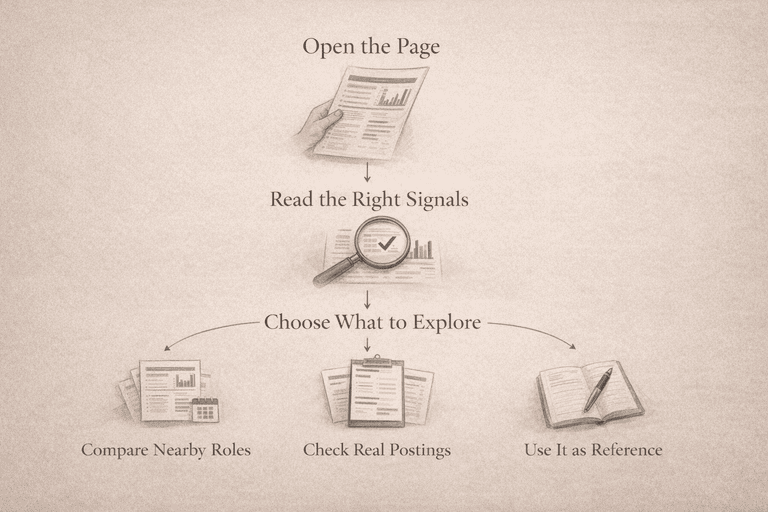
If you want a fast, practical version, use this order:
- summary
- tasks
- work context
- skills and work activities
- related occupations
That sequence gives you the highest signal fastest.
Why this order works:
- summary and tasks tell you what the job is
- work context tells you how it may feel
- skills and work activities tell you what kind of capability it rewards
- related occupations help you widen the map
You do not need to consume every section equally on the first pass.
How To Use O*NET Profiles In A Real Career Change
The best use pattern is not:
Put the tasks you identify into the transferable-skills worksheet, then distinguish what you can demonstrate from the requirements you still need to meet.
- take one profile
- decide your future from it
The better use pattern is:
- identify a plausible occupation family
- read 3 to 5 nearby O*NET profiles
- compare task patterns, work context, and related occupations
- then go read real job postings and interpret transition distance
That sequence matters because O*NET helps you understand occupational structure. Job postings help you understand market reality. You need both. Without that second step, people often confuse occupational information with actual next-move feasibility.
This is also why the profile pages are stronger for exploration than for final decision-making. They help you stop guessing wildly. They do not replace more grounded transition reasoning.
Why O*NET Is Especially Useful Early, But Not Sufficient Late
O*NET is especially good early in a career change because it gives people a structured way to widen the map.
That is a real strength when the problem is:
- I do not know what this occupation actually includes
- I need to see nearby options
- I need a better vocabulary for comparing jobs
It becomes less sufficient later, when the problem shifts to:
- what can I realistically move into from where I am now?
- what would this transition cost?
- does this solve the problem I am actually trying to solve?
That is where users often feel frustrated if they expect occupational data to behave like a personal transition planner. The pages can tell you a lot about the job. They cannot tell you enough about your move on their own.
The Most Common Adult Reading Mistake
Adults under pressure often use occupational data backward.
Instead of asking:
- what does this job actually seem to involve?
they ask:
- could this page justify leaving my current situation?
That is too much weight to put on the profile.
An occupation page can help you inspect a direction. It cannot carry the emotional or strategic burden of the whole decision. When people use it as proof that they must pivot immediately, they often end up overreading a tool that was built for structured occupational information, not for resolving constrained adult transitions by itself.
What O*NET Gets Very Right
One thing O*NET does especially well is staying inspectable.
The system is not only giving you glossy recommendations. It is giving you occupational components you can inspect:
- tasks
- knowledge
- work activities
- context
- related occupations
That makes it much stronger than many career pages that collapse everything into personality-flavored summary language. O*NET may not personalize the interpretation for you, but it does make the occupational data much more legible if you know how to read it.
That is a real strength.
The Best Practical Rule
Treat O*NET career profiles as structured reference pages, not as a verdict engine.
Use them to answer:
- what this work seems to involve
- what kind of capabilities it rewards
- what nearby occupations might also be worth exploring
- whether the work context looks more or less compatible with what you want
Do not use them by themselves to answer:
- should I do this next?
- is this my best move?
- does this solve my current career problem?
That is the boundary that keeps the tool useful.
Final Answer
O*NET career profiles are useful because they help you inspect occupations systematically instead of guessing from titles.
The best way to read them is in layers: start with summary and tasks, use skills and work activities to understand the capability pattern, check work context before romanticizing the job, and use related occupations to widen the map intelligently.
They are not there to give you a final career verdict. They are there to help you understand the occupational terrain well enough to ask better next questions.

References
[1] O*NET OnLine. Help and Occupation Information Structure.
[2] O*NET OnLine. Advanced Search.
[3] O*NET OnLine. Summary Report and Occupation Structure Resources.
[4] O*NET Resource Center. O*NET OnLine Help and Use.
[5] My Next Move. Occupation Search and Bright Outlook Information.
[6] Jiang, Z., Newman, A., Le, H., Presbitero, A., & Zheng, C. (2019). Career exploration: A review and future research agenda. Journal of Vocational Behavior, 110, 338-356.
[7] OECD. Career Guidance for Adults in a Changing World of Work.
[8] CareerMeasure. Methodology.
Get A Clearer Career Signal
Take the assessment to see what fits, what feels off, and which roles are more likely to suit you.

Builds CareerMeasure hands on and writes about career fit, role transitions, and the gap between generic personality advice and evidence-based career decisions.
Community Discussion
Share your thoughts about this article
Delete Comment?
Are you sure you want to delete this comment? This action cannot be undone.